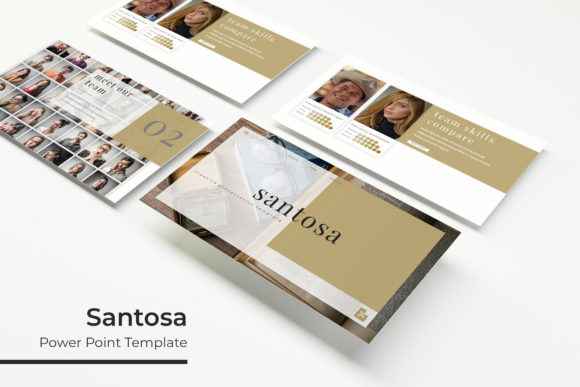
Create Stunning Presentations with Santosa Power Point Template
Crafting a presentation that holds attention and communicates your ideas with clarity is a common challenge. The Santosa Power Point Template offers a comprehensive solution designed to elevate your slides from ordinary to exceptional. With its extensive collection of over 150 total slides and thoughtful design features, this template provides a robust foundation for anyone looking to make a professional impact.
At its core, this is more than just a set of slides; it's a versatile design asset built for efficiency and visual appeal. The package includes five PPTX files, each representing a distinct premade color theme. Within each color variation, you receive 30 meticulously crafted slides, giving you a total of 150 unique layouts to work with. This structure ensures consistency throughout your presentation while offering ample variety to keep your audience engaged.
Designed for Flexibility and Professional Polish
The true value of a premium presentation template lies in its flexibility and quality of design elements. The Santosa template excels here with features that streamline the creation process. Its foundation on master slides ensures that every element, from fonts to layouts, remains pixel-perfect and easy to adjust globally. The graphics are fully resizable and editable, allowing you to tailor charts, icons, and diagrams to your specific data and brand guidelines.
Practicality is key. The template includes dedicated section break slides to structure your narrative logically, along with gallery and portfolio slides ideal for showcasing work, products, or case studies. The drag-and-drop picture placeholder functionality is a significant time-saver, enabling you to insert your own images seamlessly without distorting the layout. This focus on user-friendly editing makes it accessible to both seasoned designers and those with less technical experience.
Ideal Use Cases for a Cohesive Brand Identity
Choosing the right design assets is crucial for building a strong brand identity. This template is particularly well-suited for:
- Corporate Pitches and Investor Decks: Project confidence and professionalism with clean, structured slides that guide your audience through complex information.
- Marketing and Sales Presentations: Effectively showcase products, services, and results with dedicated portfolio and infographic slides.
- Educational Workshops and Webinars: Create engaging educational content with clear section breaks and visual aids that enhance learning.
- Creative Portfolios: Artists, photographers, and designers can use the gallery slides to present their work in a sophisticated, distraction-free environment.
The included handcrafted infographics in PowerPoint are a standout feature, transforming raw data into compelling visual stories. When your presentation needs to convey statistics or processes, these pre-built elements ensure they look polished and are easy for your audience to understand.
Tips for Selecting and Using Your Template
When evaluating any design asset, including the Santosa Power Point Template, consider a few key factors to ensure it meets your project's needs. First, review the overall aesthetic. Does the modern typography and layout style match the mood of your brand? Second, examine the slide variety. The 30 slides per color theme should cover your essential needs, from title slides and agendas to data displays and concluding calls to action.
Always check what's included in the download. Here, you receive the five PPTX files, a readme file, and information on the free font used in the preview, which simplifies setup. Remember that the photographs shown in previews are for illustration only, so you will need to source your own imagery. This is standard practice and allows you to personalize the template completely.
Finally, a well-chosen template like this acts as a starting point, not a constraint. Use it to maintain visual consistency across all your slides, which strengthens your message and brand recognition. The ability to edit every graphic and easily swap colors means you can adapt a single template for multiple projects or clients, making it a valuable addition to your library of design assets. By investing in a structured, high-quality presentation framework, you free up more time to focus on your core message and delivery.