Moiety Keynote Template: Modern, Flexible, and Ready to Use
Elevating your presentations from ordinary to extraordinary often comes down to the details. The Moiety Keynote Template is a meticulously crafted design system that offers a clean, modern aesthetic and unparalleled flexibility for professionals, creatives, and educators alike. It’s more than just a set of slides; it’s a comprehensive toolkit designed to help you communicate your ideas with clarity and visual impact.
A Foundation of Versatility and Polish
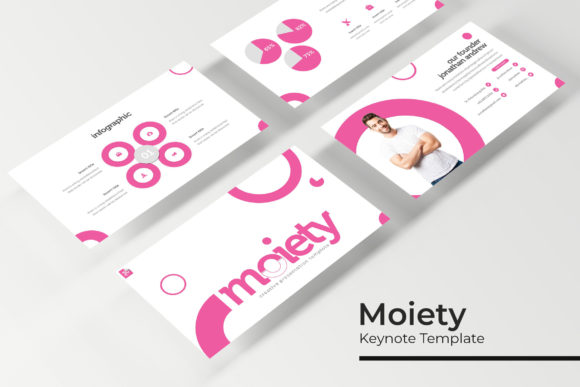
At its core, the Moiety Keynote Template is built on a foundation of smart design principles. With 150+ total slides across 5 premade color schemes, you gain immediate access to a vast library of layouts suitable for any topic. Each color variation provides 30 unique slides, ensuring you have dedicated templates for different content types—from data-heavy reports to visual portfolios. The consistent use of pixel-perfect illustrations and handcrafted infographics means every element is thoughtfully designed to enhance your message, not distract from it.
This template system is engineered for efficiency. Built entirely on master slides, it allows for global changes with a single click, saving you hours of manual editing. The resizable and editable graphics and intuitive picture placeholders make customization a breeze. Simply drag and drop your content into pre-formatted areas for a flawless, professional result every time.
Practical Use Cases for Creative Professionals
The true value of a premium design asset like this lies in its application. The Moiety template’s clean, modern typography and balanced layouts make it an excellent choice for a wide range of projects:
- Corporate & Business Presentations: Create investor pitches, quarterly reviews, and strategy decks that exude professionalism and clarity.
- Portfolio & Case Study Showcases: Use the dedicated gallery and portfolio slides to beautifully present your work, whether you're a designer, photographer, or architect.
- Educational & Workshop Materials: Structure lectures, training manuals, and workshop guides with engaging visuals that aid learning and retention.
- Marketing & Brand Launches: Develop compelling brand guidelines, product launch presentations, or social media strategy decks that align with your brand identity.
For designers, the template acts as a foundational design asset, providing a consistent visual language that can be adapted to match any brand’s color palette and style. The inclusion of section break slides helps structure your narrative, guiding your audience seamlessly from one idea to the next.
Tips for Maximizing Your Template
To get the most out of the Moiety system, consider these practical tips:
- Choose Your Color Wisely: Select from the five premade colors based on the mood of your project—whether it’s energetic, serene, corporate, or creative.
- Focus on Font Pairing: While the template uses a clean sans-serif for body text, you can enhance headings by pairing it with a complementary serif or script font for a touch of personality. Always prioritize readability.
- Leverage the Infographics: Don’t just present data; tell a story with it. Customize the handcrafted infographics to make complex information accessible and engaging.
- Maintain Consistency: Use the master slide layouts to ensure every slide in your deck feels cohesive, which is crucial for strong brand identity and a professional presentation.
Choosing the right presentation template is an investment in your communication. A well-designed system like Moiety not only saves you time but also elevates the perceived quality and credibility of your content. It provides the visual polish needed to make a lasting impression, turning your ideas into a compelling visual narrative that resonates with your audience.